How to Download MP3 from TikTok
- TikTok
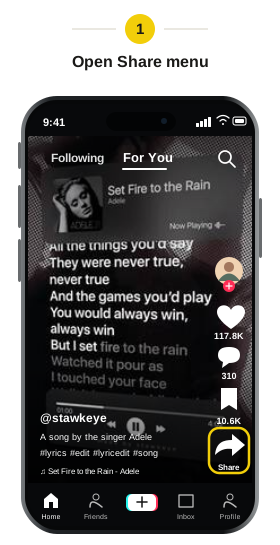
Open the video in TikTok
Find the video whose audio you want to save. Tap the Share arrow on the right.
- TikTok
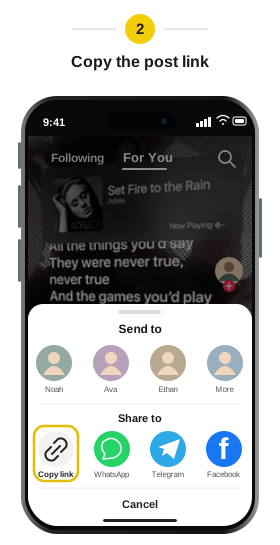
Copy the video link
Choose “Copy link” from the sharing menu, then return to Snapsss.
- Snapsss.me
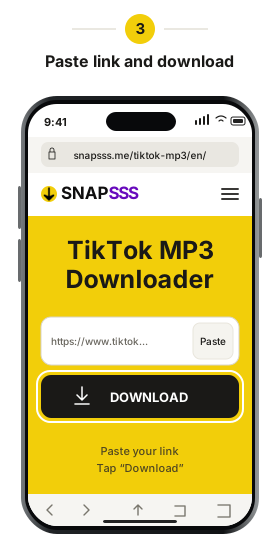
Paste the link into Snapsss
Paste the link into the field and click “Download.” Wait for the video preview to appear, then check that it’s the clip you wanted.
- Snapsss.me
Download the MP3
When the result appears, click “Download Audio (MP3).” If your browser asks you to confirm the download, accept and wait for the file to finish saving.
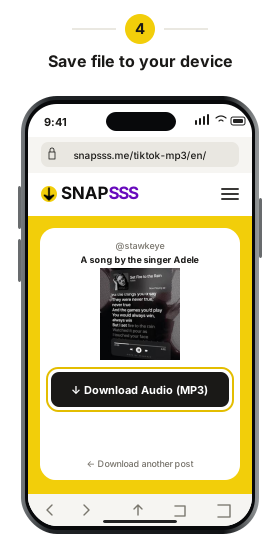
Look in your browser’s downloads list if you’re unsure where the file went. You can open the MP3 from there or move it into your music folder.
Play the saved MP3 to check that it contains the audio you wanted. A short clip may contain only part of a song, and speech or other sounds from the video may be included. You can rename the file to make it easier to find, keeping .mp3 at the end if the extension is visible.