How to Download a TikTok Story
- TikTok
Open the Story in TikTok
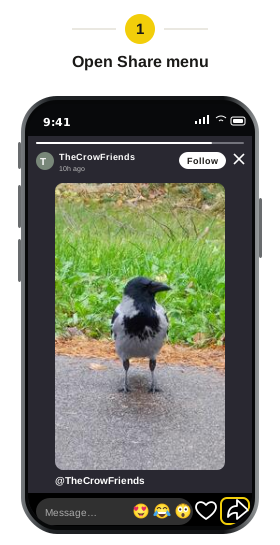
Open the Story you want to save. Tap the Share arrow at the bottom right.
- TikTok
Copy the Story link
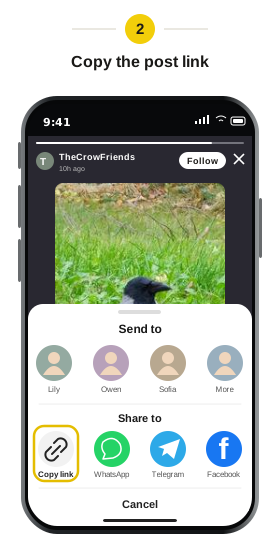
Choose “Copy link” from the sharing menu, then return to Snapsss.
- Snapsss.me
Paste the link into Snapsss
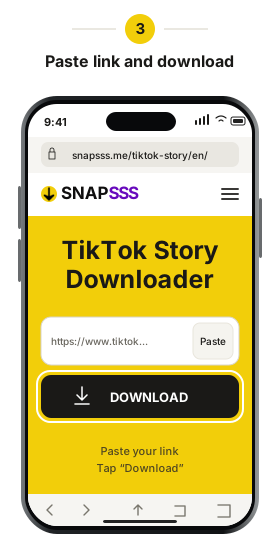
Paste the Story link into the field and click “Download.” Check the preview before saving.
- Snapsss.me
Download the Story
When the result appears, choose the video or photo download button for that Story.
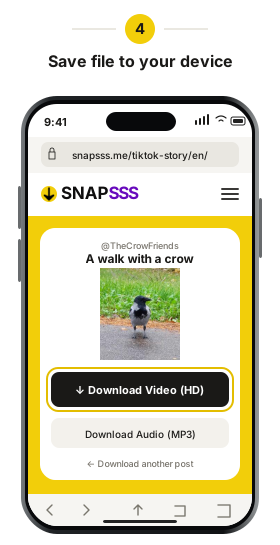
Check your browser’s downloads list if you don’t see the Story in your gallery. From there, you can open the file or move it to a folder where you’ll find it later.
Open the saved file once the download finishes to check the picture or play the video. Keep the file itself if you want to view it later, since the original Story link may stop working. For another Story from the same account, open that Story in TikTok and copy its own link.