How to Download TikTok Photos
- TikTok
Open the photo post in TikTok
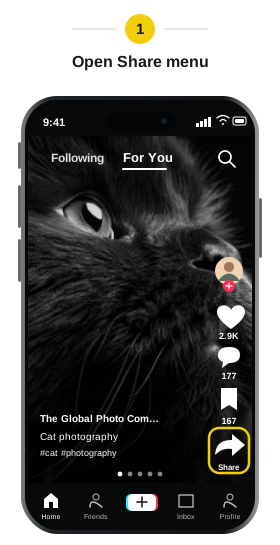
Find the photo post you want to save. Tap the Share arrow on the right.
- TikTok
Copy the post link
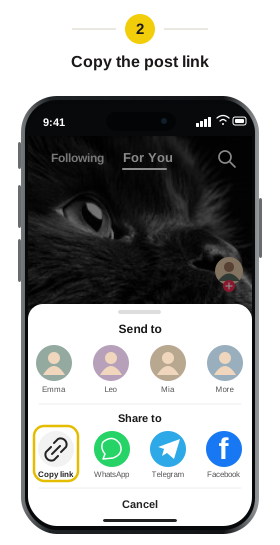
Choose “Copy link” from the sharing menu, then return to Snapsss.
- Snapsss.me
Paste the link into Snapsss
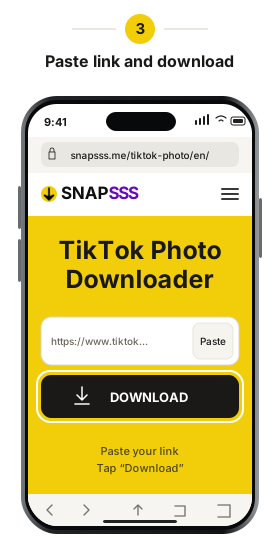
Paste the photo post link into the field and click “Download.” Wait for the pictures to load. You can then browse the post and choose which photo to save.
- Snapsss.me
Choose a photo to download
Swipe or use the arrows to find the picture you want, then click “Download Photo.” To save the whole set in one file, choose “Convert to Video.”
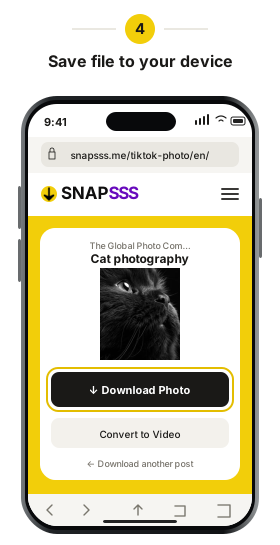
If the picture doesn’t appear in your gallery, check your browser’s downloads list. You can open the saved file from there.
Open the saved picture to check that you selected the right one. If you need another image from the same post, return to the results and select it before downloading again. Keep pictures from one post in a separate folder if you want to find them together later.